Published by SCA Digital Pty Ltd
Updated November 24, 2025
Triple M Network is OZ's home of the best classics, new rock and Footy coverage!
| Version | 4.5.497.122 |
| Size | 42.9 MB |
| What's New | General bug fixes and improvements to app stability |
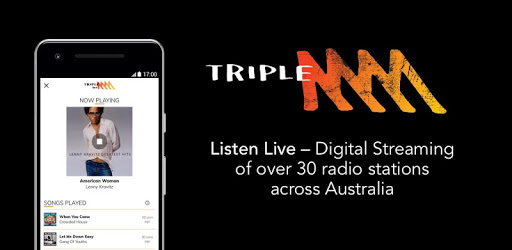
Triple M is an Android app developed and published by SCA Digital Pty Ltd at Google Play Store on Oct 15, 2013 for Android users. Triple M is so popular that it has gained 100000 installs so far and growing.
Are you tired of the same old radio stations with limited music choices? Look no further than Triple M, the ultimate app that brings you the best in classic rock, classic hits, modern rock, and so much more! With a seamless user experience and top-notch sound quality, Triple M is the go-to app for music lovers everywhere.
One of the standout features of Triple M is its exceptional sound quality. Say goodbye to the crackling and interference of traditional AM/FM radio and say hello to crystal clear music streaming. Whether you're listening through your phone or connecting to a speaker, Triple M delivers a listening experience that is second to none.
Triple M offers a wide range of music stations to cater to every taste. From classic rock anthems to the latest hits, there's something for everyone. Whether you're in the mood for some headbanging tunes or prefer a more laid-back vibe, Triple M has you covered. Explore stations from different locations and reminisce about your favorite places or listen to your own station when you're far from home.
Using Triple M is a breeze, thanks to its intuitive interface. The date selector allows you to easily navigate through time without the need to scroll back month by month. No more wasting time searching for your favorite shows or songs - everything is just a few taps away. Plus, with regular updates, Triple M continues to improve and enhance the user experience, ensuring you always have the best possible listening experience.
We understand that timezone issues can be frustrating. Rest assured, the Triple M team is working diligently to sort out any discrepancies. Your feedback is invaluable in helping us improve, so please bear with us as we strive to provide you with a seamless listening experience, no matter where you are in the world.
To select a specific Triple M station, simply navigate through the app's interface and choose from the wide range of stations available. Whether you're in the mood for classic rock, classic hits, or modern rock, Triple M has the perfect station for you.
Absolutely! Triple M allows you to listen to stations from different locations, so you can enjoy the music from places you've been to and miss dearly. Plus, if you're away from home and want to feel connected, you can always listen to your own station and bring a piece of home with you wherever you go.
If you're experiencing issues with the app not loading or working properly, we recommend uninstalling and reinstalling it. In some cases, not allowing the app to detect your location during installation can help resolve the issue. We apologize for any inconvenience this may cause and appreciate your patience as we work to ensure the app runs smoothly for all users.
Absolutely! Triple M is the perfect companion for your daily walks or workouts. Simply open the app, choose your favorite station, and enjoy the music as you go about your day. Whether you're listening to Ed & Marto in the morning or Merrick in the afternoon, Triple M will keep you entertained and motivated.
No, registration is not mandatory to enjoy Triple M. We understand that some users simply want to listen to their favorite music without any additional steps. However, if you wish to receive updates and personalized recommendations, registering can enhance your overall experience with the app.
Triple M is the ultimate app for music enthusiasts who crave variety, exceptional sound quality, and a seamless user experience. With its wide range of music stations and continuous improvements, Triple M is here to revolutionize your listening experience. Download the app today and discover a whole new world of music!
Yes, you can run Triple M on PC, but first, you will need emulator software installed on your Windows or MAC, which you can download for free. In the below video, you will find Triple M in action. Before you install the emulator, check out the minimum and recommended system requirements to run it seamlessly. They may change depending on which version of the emulator you choose. Therefore, we recommend you download the latest version of the emulator. Below you will find three free Android emulators that we have shortlisted based on their popularity:
Up to date graphics drivers from Microsoft or the chipset vendor.
Storage: 1 GB available under installation path, 1.5GB available hard drive space
Internet: Broadband Internet connection
Regardless of which Android emulator you install, the steps to install, configure, and running the Triple M app on PC are the same.


![Musicolet Music Player [Free, No ads] icon](https://cdn.desktoptwo.com/img/in.krosbits.musicolet-logo.png)