Published by August Home Inc
Updated April 21, 2026
Control your August devices from your smartphone
| Version | 26.1.0 |
| Size | 87.2 MB |
| What's New | General bug fixes and improvements. |
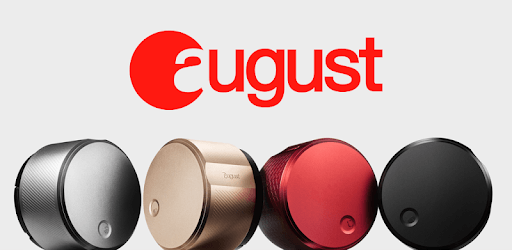
August Home is an Android app developed and published by August Home Inc at Google Play Store on Sep 25, 2015 for Android users. August Home is so popular that it has gained 100000 installs so far and growing.
Imagine never having to worry about whether your front or back door is locked. With the August Home app, this becomes a reality. This innovative app allows you to log in from anywhere and check the status of your doors, without the need for a key. It's truly a game-changer and the best investment you can make for your home.
Bringing groceries home has never been easier with the August Home app. Say goodbye to fumbling for keys and struggling to unlock the door with your hands full. The app provides a seamless experience, allowing you to unlock your door effortlessly with just a few taps on your phone. It's a small change that makes a big difference in your daily life.
August Home has been a trusted name in smart locks since early 2016, and for good reason. The app works flawlessly, providing on-demand access to your locks whenever you need it. Whether you're at home or traveling overseas, you can rely on the August Home app to let guests in and keep your home secure. With its added widget feature, accessing your locks has never been easier.
The August Home app is designed to work seamlessly with your smart lock, ensuring a reliable and hassle-free experience. Users have reported that the app and the actual lock work perfectly, without any issues. The only limitation seems to be the battery life, which lasts slightly over three months. However, this small inconvenience is outweighed by the app's overall performance.
If you're living in an apartment, the August Home app is the perfect solution for you. With its "over the lock" smart lock design, it seamlessly integrates with your existing lock, providing enhanced security and convenience. Users have reported that the August Pro locks work flawlessly in their apartments, making it the go-to choice for smart locks.
As a guest on the August Home app, you can enjoy convenient access to your host's home without the need for a key. This means you can come and go as you please without disturbing anyone. It's a simple and effective solution that enhances your overall experience as a guest.
The August Home app does exactly what it's supposed to do, as long as your phone has service and your lock has access to Wi-Fi. Some users have reported the need to force stop the app occasionally to get it to open, but overall, the app's functionality is top-notch. It's designed to be user-friendly and reliable, ensuring a smooth experience every time.
With the August Home app, you can enjoy the peace of mind that comes with a secure and convenient home. Whether you're giving temporary access to house cleaners or pet sitters or simply unlocking your door after a long day, this app has got you covered. It even works when the power is out, ensuring you're never locked out of your own home.
Countless users have expressed their satisfaction with the August Home app and its accompanying hardware. It's a great device that's easy to set up and use. The app sends notifications whenever one of your approved users accesses the lock, keeping you informed and in control. If you've ever locked yourself out of the house, this app is a must-have.
Imagine walking up to your front door and having it automatically unlock as it detects your phone. That's the magic of the August Home app. While it may not always pick up your phone immediately, it's a small inconvenience compared to the overall convenience it provides. Plus, the sleek design of the device enhances the look of your existing lock, giving it a modern and sophisticated touch.
When it comes to smart locks, August is the industry leader for a reason. Many users have shared their negative experiences with other brands, leading them to switch to August. The latest generation of August locks looks amazing and performs flawlessly, meeting all their expectations. If you're in the market for a smart lock, there's no better choice than August.
While some may wonder why the August Home app and hardware don't work for everybody, the majority of users have had a fantastic experience with this equipment. It works seamlessly and reliably, providing a convenient and secure solution for your home. Don't hesitate to join the many satisfied customers who have made the switch to August. You won't regret it.
Upgrade your home with the August Home app and experience the convenience and security it offers. With quick and reliable connectivity, it's a perfect fit for those with a stable internet connection. Don't miss out on one of the best upgrades you can make for your home.
A: The batteries in the August lock typically last slightly over three months.
A: Absolutely! The August Home app is the best "over the lock" smart lock for apartments.
A: The August Home app requires a stable internet connection to function properly.
A: Yes, the August Home app is designed to be user-friendly and simple to set up.
A: Yes, the August Home app allows you to temporarily give access to your home for house cleaning or pet sitting.
Yes, you can run August Home on PC, but first, you will need emulator software installed on your Windows or MAC, which you can download for free. In the below video, you will find August Home in action. Before you install the emulator, check out the minimum and recommended system requirements to run it seamlessly. They may change depending on which version of the emulator you choose. Therefore, we recommend you download the latest version of the emulator. Below you will find three free Android emulators that we have shortlisted based on their popularity:
Up to date graphics drivers from Microsoft or the chipset vendor.
Storage: 1 GB available under installation path, 1.5GB available hard drive space
Internet: Broadband Internet connection
Regardless of which Android emulator you install, the steps to install, configure, and running the August Home app on PC are the same.