Published by peakstar technologies Inc.
Change your IP to unblock websites, browse privately with this fast VPN access.
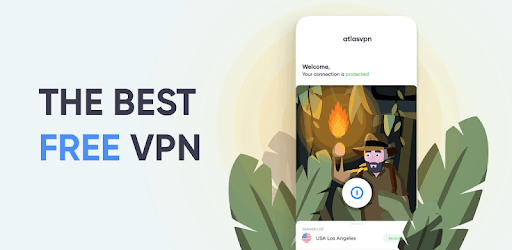
Atlas VPN - Unlimited, Secure & Free VPN Proxy is an Android app developed and published by peakstar technologies Inc. at Google Play Store on Jan 9, 2020 for Android users. Atlas VPN - Unlimited, Secure & Free VPN Proxy is so popular that it has gained 2669159 installs so far and growing.
Are you tired of restricted access to certain websites and apps? Do you want to browse the internet securely and anonymously? Look no further than Atlas VPN - the ultimate solution for all your online privacy needs. With its high speed, great coverage, and excellent support, Atlas VPN is the go-to app for millions of users worldwide.
Atlas VPN provides unlimited access to the internet, allowing you to browse your favorite websites and use your preferred apps without any restrictions. Whether you're streaming videos, downloading files, or simply browsing social media, Atlas VPN ensures a seamless and uninterrupted online experience.
Your online security and privacy are of utmost importance, and Atlas VPN takes this seriously. With advanced encryption technology, Atlas VPN protects your personal information and ensures that your online activities remain private and secure. Say goodbye to hackers, data breaches, and intrusive advertisers - Atlas VPN has got you covered.
Atlas VPN is designed with simplicity in mind. Its intuitive interface makes it easy for anyone to use, even if you're not tech-savvy. Simply download the app, connect to a server, and enjoy a seamless browsing experience. No complicated settings or configurations - Atlas VPN takes care of everything for you.
When it comes to VPNs, speed is crucial. Atlas VPN offers lightning-fast connections, ensuring that you can stream, download, and browse without any lag or buffering. With servers located all around the world, you can enjoy a reliable and stable connection no matter where you are.
A: While Atlas VPN works flawlessly on most devices, it currently does not support landscape mode on tablets. However, the developers are continuously working to improve the app's compatibility and address any issues that may arise.
A: Yes, Atlas VPN offers a free version that provides basic features and allows you to change your IP address. However, for advanced features and unlimited access, you can upgrade to the premium version at an affordable price.
A: Absolutely! Atlas VPN prioritizes your online security and privacy. With its advanced encryption technology, your personal information remains secure and protected from any potential threats.
A: Atlas VPN boasts a vast network of servers located all around the world. This ensures that you can always find a server that suits your needs, whether you're looking for faster speeds or access to geo-restricted content.
With its unlimited access, top-notch security, and user-friendly interface, Atlas VPN is the best choice for anyone looking to enhance their online experience. Don't miss out on the opportunity to enjoy a fast, secure, and unrestricted internet - download Atlas VPN today!
Yes, you can run Atlas VPN - Unlimited, Secure & Free VPN Proxy on PC, but first, you will need emulator software installed on your Windows or MAC, which you can download for free. In the below video, you will find Atlas VPN - Unlimited, Secure & Free VPN Proxy in action. Before you install the emulator, check out the minimum and recommended system requirements to run it seamlessly. They may change depending on which version of the emulator you choose. Therefore, we recommend you download the latest version of the emulator. Below you will find three free Android emulators that we have shortlisted based on their popularity:
Up to date graphics drivers from Microsoft or the chipset vendor.
Storage: 1 GB available under installation path, 1.5GB available hard drive space
Internet: Broadband Internet connection
Regardless of which Android emulator you install, the steps to install, configure, and running the Atlas VPN - Unlimited, Secure & Free VPN Proxy app on PC are the same.