Published by Paul Lutus
Updated July 22, 2026
SSHelper is an advanced, multi-protocol, secure server for the Android platform.
| Version | 13.2 |
| Size | 22.3 MB |
| What's New | Sorry -- this app cannot be updated to full compliance with Android 10 (API 29) (but it works correctly with Android 10). This means SSHelper will disappear from Google Play within 60 days at most. Please visit the SSHelper Home Page (https://arachnoid.com/android/SSHelper/) for full details and future updates. |
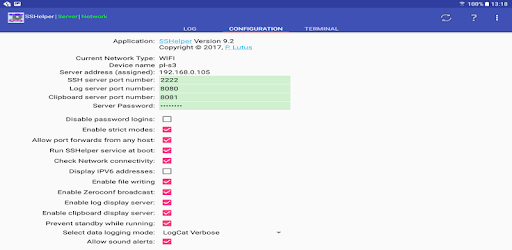
SSHelper is an Android app developed and published by Paul Lutus at Google Play Store on Feb 27, 2012 for Android users. SSHelper is so popular that it has gained 10000 installs so far and growing.
Are you looking for a reliable and feature-rich SSH app for your Android device? Look no further than SSHelper. This open-source software, based on OpenSSH, is a true gem in the world of mobile applications. Whether you're a seasoned developer or a casual user, SSHelper has everything you need to establish a secure and efficient connection between your Linux box and your Android device.
SSHelper is packed with incredible features that make it stand out from the crowd. One of its greatest strengths is its simplicity. With a straightforward implementation, this app allows for bidirectional file and directory transfer using popular tools like rsync and Filezilla (SFTP). Whether you need to transfer large amounts of data or simply access your files remotely, SSHelper has got you covered.
When it comes to SSH2 protocol server apps, SSHelper is in a league of its own. With years of experience and countless gigabytes of traffic under its belt, this app has proven to be the most reliable and user-friendly option on the market. Even on older devices with limited resources, SSHelper performs flawlessly, ensuring uninterrupted sessions and smooth file transfers.
SSHelper has garnered a loyal following of users who recognize its true value. Unfortunately, recent Android releases have posed challenges for apps like SSHelper. However, the developer's dedication and the critical need for the functions it provides have not gone unnoticed. Users hope for a resurrection of this incredible app in the future, as it continues to be a vital tool for many.
Users of the Pixel 4a and other Android devices can rejoice, as SSHelper works perfectly on these platforms. With a simple command-line interface, you can effortlessly pull down photos, transfer files, and more. While the user interface may seem a bit complicated at first, you can easily navigate it and enjoy a seamless experience by accepting the default settings.
SSHelper empowers users to take control of their own devices, free from unnecessary restrictions. With the ability to copy data to and from your devices using a USB cable, you can keep your files secure and private. Say goodbye to sending your data halfway across the globe for Google to scrutinize. Your data belongs to you, and SSHelper ensures it stays that way.
SSHelper is not just a simple app; it's a gateway to a world of possibilities. By creating a suitable user account and utilizing RSA authentication, you can unlock Linux-like features on your Android device. From running rsync to copying only the differences in a large file tree to accessing a command line on your phone, SSHelper transforms your device into a powerful tool that goes beyond its original capabilities.
Yes, SSHelper is compatible with a wide range of Android devices, including the latest models.
Absolutely! SSHelper is designed to work seamlessly on both older and newer Android versions.
You can grab the latest release (130) of SSHelper from the author's website.
Yes, Google's recent API changes have impacted SSHelper. However, the final release of the app is still available for use.
While the future of SSHelper remains uncertain, users hope for a potential resurrection of this invaluable app.
Experience the power and versatility of SSHelper today and take control of your Android device like never before. Download the app now and unlock a world of possibilities!
Yes, you can run SSHelper on PC, but first, you will need emulator software installed on your Windows or MAC, which you can download for free. In the below video, you will find SSHelper in action. Before you install the emulator, check out the minimum and recommended system requirements to run it seamlessly. They may change depending on which version of the emulator you choose. Therefore, we recommend you download the latest version of the emulator. Below you will find three free Android emulators that we have shortlisted based on their popularity:
Up to date graphics drivers from Microsoft or the chipset vendor.
Storage: 1 GB available under installation path, 1.5GB available hard drive space
Internet: Broadband Internet connection
Regardless of which Android emulator you install, the steps to install, configure, and running the SSHelper app on PC are the same.