Radar Express - with NOAA Weather for PC

Radar Express - with NOAA Weather for PC

Published by Appd Lab LLC

Updated August 8, 2025

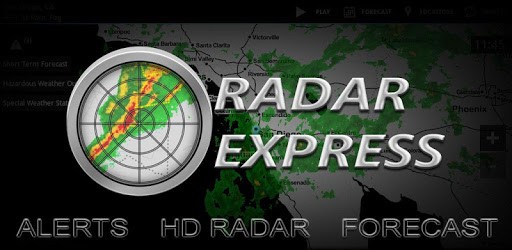
Weather radar, alerts, and forecast from your local NOAA NWS office.

What's New

Version2.5.22
Size23.0 MB
What's NewThank you for using RadarX! This update fixes some bugs and improves performance.

Radar Express - with NOAA Weather Screenshots

Radar Express - with NOAA Weather PC screenshot

About Radar Express - with NOAA Weather For PC

Radar Express - with NOAA Weather is an Android app developed and published by Appd Lab LLC at Google Play Store on Jan 24, 2013 for Android users. Radar Express - with NOAA Weather is so popular that it has gained 1000000 installs so far and growing.

Radar Express - with NOAA Weather: Your Handy Weather Companion

Radar Express - with NOAA Weather offers a simple yet powerful way to stay informed about current weather conditions. Whether it's storm tracking, precipitation, or detailed forecasts you're after, Radar Express provides all the essentials without unnecessary clutter. Let's dive into what makes this weather app stand out.

No Unneeded Data Collection

With growing concerns around privacy, Radar Express is designed to be a safe choice. The app does not collect unnecessary data, ensuring that your information remains private. This focus on low data usage makes it ideal for those who need weather updates without compromising on privacy.

Quick Access to Local and Regional Information

Radar Express quickly offers all the local and regional weather information you need. Once you open the app, the radar loads instantly, showing you real-time weather conditions. There is no fluff or bias, just pure and accurate weather data. The app also ensures that severe storms show their direction if warnings are in place, keeping you prepared for any weather scenario.

Efficient and Unobtrusive Ads

One of the most notable features of Radar Express is its minimal advertising. Even without purchasing the ad-free version, the ads remain tiny and unobtrusive, allowing for an uninterrupted user experience. For those who prefer a completely ad-free experience, the option to purchase it exists, making the app flexible for different needs.

Instant Functionality and Easy Navigation

The simplicity and efficiency of Radar Express are worth noting. From the moment you open the app, it is up and running instantly. You don’t need to navigate through multiple screens or links to get the information you need. The app focuses on making weather tracking as straightforward as possible.

Accurate Weather Depiction

One of the strengths of Radar Express is its accurate depiction of precipitation and its quick animation. The app shows watches and warnings clearly, helping you make informed decisions based on reliable data. Whether it's tracking an approaching storm or just planning your day, Radar Express offers precise weather forecasts down to the hourly.

Added Features and Updates

Over time, Radar Express has continued to improve. Recent updates have brought back popular features like GPS location, enhancing the overall user experience. It’s this responsiveness to user feedback that keeps the app relevant and efficient.

Best-In-Class Radar Image and Forecasts

The radar image is the heart of Radar Express, and it does not disappoint. The radar is fluid, and loads quickly, providing a clear picture of what’s happening in the skies. Additionally, the app includes detailed weather forecasts, catering to those who need a thorough understanding of upcoming weather conditions.

Weather Updates on the Go

For those who are always out and about, Radar Express becomes an invaluable tool. Knowing what weather is coming your way helps you plan better and stay safe. The app is designed to be your go-to source for all weather-related updates.

A Hidden Gem Among Weather Apps

While perhaps not as widely known as some other weather apps, Radar Express is a hidden gem. Its clean interface and accurate information make it a standout choice. Whether you’re tracking storms or just checking daily forecasts, this app has everything you need without any unnecessary extras. The app is solid and continues to be a reliable tool over the years.

Reliable Radar and Forecasts

Radar Express is highly favored for its dependability. The app provides detailed and accurate forecasts, helping users stay aware of current and future weather conditions. The radar function is particularly highlighted for its precision and ease of use.

User-Friendly Design

The simplicity of Radar Express’s design makes it accessible to everyone. It is straightforward and does exactly what you expect a weather app to do. The layout is clean and easy to navigate, ensuring that you find the information you need quickly.

Radar Express - with NOAA Weather is an essential tool for anyone looking to stay informed about current weather conditions. Its focus on privacy, ease of use, and accurate radar make it a standout choice in the realm of weather apps.

Can I run Radar Express - with NOAA Weather on PC?

Yes, you can run Radar Express - with NOAA Weather on PC, but first, you will need emulator software installed on your Windows or MAC, which you can download for free. In the below video, you will find Radar Express - with NOAA Weather in action. Before you install the emulator, check out the minimum and recommended system requirements to run it seamlessly. They may change depending on which version of the emulator you choose. Therefore, we recommend you download the latest version of the emulator. Below you will find three free Android emulators that we have shortlisted based on their popularity:

How to Install Radar Express - with NOAA Weather on Windows PC

BlueStacks

Minimum
  • OS: Microsoft Windows 7 and above.
  • Processor: Intel or AMD Processor.
  • RAM: Your PC must have at least 4GB of RAM. (Note that having 4GB or more disk space is not a substitute for RAM)
  • Storage: 5GB Free Disk Space.
  • You must be an Administrator on your PC.
Recommended:
  • OS: Microsoft Windows 10
  • Processor: Intel or AMD Multi-Core Processor with Single Thread benchmark score > 1000.
  • Graphics: Intel/Nvidia/ATI, Onboard or Discrete controller with benchmark score >= 750.
  • Please ensure Virtualization is enabled on your PC/Laptop.
  • RAM: 8GB or higher
  • Storage: SSD (or Fusion/Hybrid Drives)
  • Internet: Broadband connection to access games, accounts and related content.

Up to date graphics drivers from Microsoft or the chipset vendor.

  • To start with, download Bluestacks from its official website. The latest version of BluesStacks is v 5, and it is around 400 MB.
  • Once the download is done, click on the Bluestacks set up file to install it on your Windows PC. Follow the on-screen instructions and install it accordingly.
  • The next step is to launch the emulator using the desktop shortcut and sign in using your Google account.
  • Now, head over to Bluestacks home screen and click on the Google Play Store icon.
  • Hit the search bar in Google Play and search for Radar Express - with NOAA Weather.
  • Install Radar Express - with NOAA Weather from the Play Store by clicking the Install option, which completes downloading of Radar Express - with NOAA Weather on PC.

NoxPlayer

Minimum
  • Operating System: Windows XP SP3, Windows Vista, Windows 7, Windows 8, Windows 10, and DirectX 9.0c
  • Processor: At least dual-core processor, both Intel, and AMD are OK
  • Video: Supports Open GL 2.0 or above
  • Memory: 1.5 GB RAM
Recommended
  • Operating System: Windows 7, Windows 8, Windows 10
  • Processor: Multiple core processors which support VT-x or AMB-V Virtualization Technology, better performance with this function enabled
  • Video: The higher performance, the better
  • Memory: 4 GB RAM

Storage: 1 GB available under installation path, 1.5GB available hard drive space

Internet: Broadband Internet connection

  • Download NoxPlayer from the official website. The latest version of NoxPlayer is v 3, and it is around 600 MB.
  • Now install the emulator using the downloaded setup file. Just go through the on-screen instructions and install NoxPlayer on your computer or laptop.
  • After the installation process, launch the Nox Android emulator and log in using your Google account when it asks you.
  • Click on the Google Play Store icon and head over to the search bar to search Radar Express - with NOAA Weather. Once found, click on the Install button to install Radar Express - with NOAA Weather for PC.
  • If you do not find Radar Express - with NOAA Weather on Google Play Store or if you want to skip logging in to Google, you can sideload APK (download the .APK file from this page and open it with NoxPlayer).
  • Launch Radar Express - with NOAA Weather from home-screen and start playing it on PC right away!

MEmu

Minimum
  • 2 cores x86/x86_64 Processor (Intel or AMD CPU)
  • WinXP SP3 / Win7 / Win8 / Win10 (Not recommended to run on Server/Enterprise)
  • Latest Windows DirectX 11 / Graphics driver with OpenGL 2.0
  • Hardware Virtualization Technology (Intel VT-x/AMD-V) shall be enabled in BIOS
  • 2GB of RAM (4GB for x64 system)
  • 5GB of hard disk free space
Recommended
  • OS: Microsoft Windows 10 with VT Enabled
  • CPU: Single Thread PassMark score > 1500 (Intel/AMD Multi-Core).
  • Graphics: Intel/Nvidia/ATI, Onboard or Discrete controller with PassMark score > 750.
  • Latest Windows DirectX 11 / Graphics driver with OpenGL 4.5 or higher
  • RAM: 8GB or higher
  • HDD: SSD, 10GB of hard disk free space
  • Internet: Broadband connection with low latency for FPS games
  • Download MEmu Play from the official website. The latest version of NoxPlayer is v 7.5.
  • When the download is completed, install the MEmu emulator on your PC. Follow the on-screen instructions and keep on clicking the Next button until the final step.
  • Now, using the desktop shortcut, look for the MEmu Play emulator and launch it. Once done, it will ask you to log in using your Google account, proceed with the same.
  • MEmu Play will ask you to log in using your Google account. When you log in, it will sync your Google account to MEmu Play. Launch the Google Play Store by clicking on the icon and search for Radar Express - with NOAA Weather.
  • Click on the Install button once you find Radar Express - with NOAA Weather from the search results. You can also sideload APK (download the .APK file from this page and open it with MEmu) if you want to skip above step.
  • After the installation of Radar Express - with NOAA Weather, you're all set to use the app on PC!

Regardless of which Android emulator you install, the steps to install, configure, and running the Radar Express - with NOAA Weather app on PC are the same.
Download Radar Express - with NOAA Weather For PC