Published by Abhirav
Updated June 4, 2026
Create notes on the go.
| Version | 4.1.1 |
| Size | 22.6 MB |
| What's New | - Choose app theme (Dark, Light, System)- Performance enhancement- Italian language support- GDPR consent integration |
Memo - Notes is an Android app developed and published by Abhirav at Google Play Store on Oct 25, 2016 for Android users. Memo - Notes is so popular that it has gained 1589942 installs so far and growing.
Are you tired of carrying around pen and paper everywhere you go? Do you often find yourself needing to jot down important information or make a quick note? Look no further than Memo - Notes, the ultimate app for all your note-taking needs. With its user-friendly interface and convenient features, this app is a must-have for anyone who wants to stay organized and productive on the go.
Memo - Notes is the perfect companion for all your note-taking needs. Whether you need to jot down a quick idea, create a shopping list, or write a song, this app has got you covered. Its intuitive design allows you to easily create, edit, and organize your notes with just a few taps. Say goodbye to the hassle of carrying around a pen and paper – with Memo - Notes, you'll always have a convenient way to capture your thoughts.
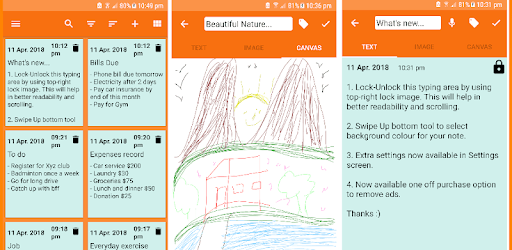
One of the standout features of Memo - Notes is its security feature. With this app, you can put passwords on your notes and other sensitive information without having to worry about unauthorized access. This means you can store your personal thoughts, important passwords, and confidential details with peace of mind. It's like having a personal vault for your ideas.
Personalization is key when it comes to note-taking, and Memo - Notes understands that. With this app, you have the freedom to customize your note pages to suit your preferences. Change the color of your memo page, insert pictures, or even draw on your notes – the possibilities are endless. Whether you're using it for maps and directions, recipes, or simple phone messages, Memo - Notes offers a practical and enjoyable note-taking experience.
Have you ever experienced the panic of losing all your important data? With Memo - Notes, that fear becomes a thing of the past. This app allows you to back up and restore your notes effortlessly. Even if you switch to a new phone or encounter an Android glitch, you can rest assured that your data is safe and easily recoverable. Say goodbye to the frustration of losing valuable information – Memo - Notes has got your back.
Unfortunately, Memo - Notes is currently only available for Android devices. However, there are similar note-taking apps available for iPhone users, such as Google Keep.
While Memo - Notes offers a wide range of customization options, including changing the color of your memo page, it does not currently have a dark theme mode. However, the developers are constantly working on improving the app, so it's possible that this feature may be added in the future.
Absolutely! Memo - Notes allows you to lock your notes with a password, ensuring that only you can access them. This feature adds an extra layer of security to your sensitive information.
At the moment, Memo - Notes does not include a trash bin feature. However, the developers are always open to feedback and suggestions, so it's possible that this feature may be added in a future update.
Currently, Memo - Notes does not display the time when a note was written. However, the developers are constantly working on improving the app's functionality, so it's possible that this feature may be added in a future update.
Unfortunately, Memo - Notes does not currently have a password entry feature. However, the developers are always looking for ways to enhance the app, so it's possible that this feature may be added in the future.
Overall, Memo - Notes is a versatile and user-friendly app that offers a seamless note-taking experience. With its convenient features, customizable interface, and secure storage, this app is a must-have for anyone who wants to stay organized and productive. Download Memo - Notes today and take your note-taking to the next level!
Yes, you can run Memo - Notes on PC, but first, you will need emulator software installed on your Windows or MAC, which you can download for free. In the below video, you will find Memo - Notes in action. Before you install the emulator, check out the minimum and recommended system requirements to run it seamlessly. They may change depending on which version of the emulator you choose. Therefore, we recommend you download the latest version of the emulator. Below you will find three free Android emulators that we have shortlisted based on their popularity:
Up to date graphics drivers from Microsoft or the chipset vendor.
Storage: 1 GB available under installation path, 1.5GB available hard drive space
Internet: Broadband Internet connection
Regardless of which Android emulator you install, the steps to install, configure, and running the Memo - Notes app on PC are the same.