Published by WildWorks
Updated January 25, 2024
Become Ryan and see how far you can go in this adventurous runner.
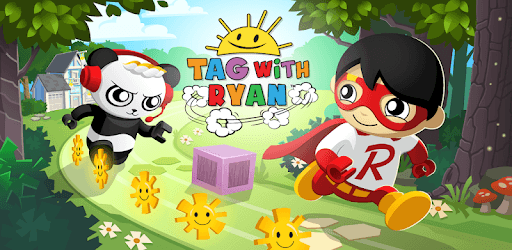
Tag with Ryan is an Android app developed and published by WildWorks at Google Play Store on Dec 17, 2018 for Android users. Tag with Ryan is so popular that it has gained 29187377 installs so far and growing.
Are you looking for a game that will keep your children entertained for hours? Look no further than Tag with Ryan! This game has captured the hearts of kids all over the world with its exciting gameplay and colorful graphics. Let's dive into what makes Tag with Ryan so special.
Tag with Ryan is a game that offers endless fun and adventure for kids of all ages. The gameplay is simple yet addictive - you have to tag as many objects as possible while running through different worlds. With each level, the challenges become more exciting, keeping your children engaged and entertained.
One of the best things about Tag with Ryan is the variety it offers. From running through the woods to exploring new worlds with green fog, there is always something new and exciting to discover. The game keeps your children on their toes, eager to see what comes next.
Tag with Ryan allows your children to customize their gaming experience. They can change characters, cars, and even transform into Emma and Kate. This level of customization adds a personal touch to the game, making it even more enjoyable for your little ones.
Not only can they customize their appearance, but they can also collect different Ryan characters throughout the game. This adds an element of excitement and achievement as they strive to collect them all. Your children will feel a sense of pride as they unlock new characters and show them off to their friends.
One of the biggest concerns for parents when it comes to mobile games is the presence of ads and lag. Thankfully, Tag with Ryan has addressed these concerns. The game is ad-free, ensuring that your children can play without any interruptions. Additionally, it runs smoothly without any lag, providing a seamless gaming experience.
The developers have also prioritized the quality of the game. Tag with Ryan boasts stunning graphics and impressive gameplay, ensuring that your children are fully immersed in the world of Ryan. The attention to detail is evident in every aspect of the game, from the vibrant biomes to the adorable costumes.
Yes, Tag with Ryan is suitable for kids of all ages. Its simple gameplay and colorful graphics make it accessible and enjoyable for everyone.
Absolutely! Tag with Ryan allows your children to customize their characters, cars, and even transform into Emma and Kate.
No, Tag with Ryan is completely ad-free. Your children can play without any interruptions.
No, the developers have optimized Tag with Ryan to ensure a smooth and lag-free gaming experience.
Yes, your children can collect different Ryan characters throughout the game, adding an element of excitement and achievement to their gameplay.
Overall, Tag with Ryan is a game that guarantees endless fun and excitement for kids. With its customizable features, ad-free experience, and stunning graphics, it's no wonder that children all over the world are obsessed with this game. So why wait? Let your children embark on a thrilling adventure with Ryan and his friends today!
Yes, you can run Tag with Ryan on PC, but first, you will need emulator software installed on your Windows or MAC, which you can download for free. In the below video, you will find Tag with Ryan in action. Before you install the emulator, check out the minimum and recommended system requirements to run it seamlessly. They may change depending on which version of the emulator you choose. Therefore, we recommend you download the latest version of the emulator. Below you will find three free Android emulators that we have shortlisted based on their popularity:
Up to date graphics drivers from Microsoft or the chipset vendor.
Storage: 1 GB available under installation path, 1.5GB available hard drive space
Internet: Broadband Internet connection
Regardless of which Android emulator you install, the steps to install, configure, and running the Tag with Ryan app on PC are the same.