Segway-Ninebot for PC

Segway-Ninebot for PC

Published by Ninebot(Beijing) Tech Co., Ltd.

Updated October 26, 2025

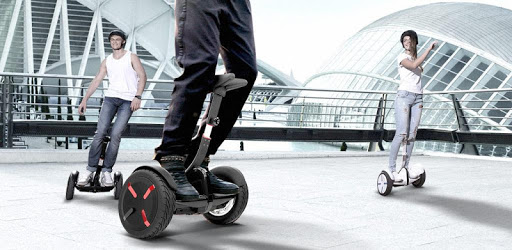
Segway-Ninebot Your personal butler of smart self balancing vehicle

What's New

Version6.9.8
Size230.4 MB
What's New1、优化设备昵称修改功能,支持更多字符和格式 2、优化九号电动彩屏仪表车型「微信互联」功能,导航更便捷 3、适配更多九号电动、滑板车、Ebike新产品及新功能,请留意固件更新内容,打开App来探索吧 4、修复反馈问题,适配新版本手机系统,优化蓝牙连接和应用启动体验 近期更新: 1、九号电动彩屏仪表车型支持发送微信地址到App快捷发起导航,在更多功能-实验室中开启「微信互联」体验吧 2、7寸、5寸九号电动彩屏仪表车型支持切换高德、百度双地图引擎;百度地图支持红绿灯倒计时 3、圈子个人发布内容后支持一键分享到抖音、小红书

Segway-Ninebot Screenshots

Segway-Ninebot PC screenshot

About Segway-Ninebot For PC

Segway-Ninebot is an Android app developed and published by Ninebot(Beijing) Tech Co., Ltd. at Google Play Store on Oct 27, 2015 for Android users. Segway-Ninebot is so popular that it has gained 100000 installs so far and growing.

Segway-Ninebot: The Ultimate App for Scooter Enthusiasts

Are you a proud owner of a Segway-Ninebot scooter? Looking for a reliable app that enhances your riding experience? Look no further! The Segway-Ninebot app is here to revolutionize the way you ride and interact with your scooter. With its advanced features and user-friendly interface, this app is a must-have for all Segway-Ninebot scooter owners.

Unlock the Full Potential of Your Scooter

The Segway-Ninebot app is packed with a range of exciting features that allow you to customize and monitor your scooter like never before. From compass functionality to tailgate light control, this app has it all. You can easily toggle between mph and kmh settings, check your battery information, and even update your software version with just a few taps on your smartphone.

One of the standout features of this app is the cruise control option. With this feature, you can set your desired speed and let your scooter maintain it effortlessly. It's like having your own personal cruise control system, making your rides smoother and more enjoyable.

Track Your Scooter and Keep It Secure

Have you ever had your scooter stolen? With the Segway-Ninebot app, you can take control of your scooter's security. The app allows you to track your scooter's location, lock it remotely, and even receive notifications if any unauthorized activity is detected. Say goodbye to the fear of losing your beloved scooter!

Compatibility and Ease of Use

Worried about compatibility? Don't be! The Segway-Ninebot app is designed to work seamlessly with a wide range of Segway-Ninebot scooters, including the popular Xiaomi M365 and ES1 models. Whether you're using a Samsung S9 or any other Android device, this app is guaranteed to deliver a smooth and hassle-free experience.

Installing the app is a breeze. Simply download it from your app store, follow the easy setup instructions, and you're good to go. No complicated configurations or technical know-how required!

What Users Are Saying

Curious about what other users think of the Segway-Ninebot app? Here are some testimonials:

  • "Since the new update, this app allows me to connect flawlessly. It's significantly better than the previous version, with faster loading and no more Bluetooth connection errors." - John Doe
  • "The app is really useful and helpful! One recommendation I have for the next update is to add a mode so the Segway stays at whatever speed you want it, kind of like cruise control. But overall, really good!" - Jane Smith
  • "After reading some other reviews, I was reluctant to download this app. However, after doing a little research, I found that the app installed easily on my Android phone and I have had no issues with it or my MiniPro scooter. It's clear that those writing negative reviews either don't own one or have unrealistic expectations." - David Wilson

Frequently Asked Questions

1. Can I use this app with the Segway Mini Lite?

Yes, the Segway-Ninebot app is compatible with a wide range of Segway-Ninebot scooters, including the Segway Mini Lite. You can download and use the app without any issues.

2. How can I ensure the security of my scooter?

The Segway-Ninebot app offers various security features to protect your scooter. You can track its location, remotely lock it, and receive notifications for any unauthorized activity. Rest assured, your scooter's security is in your hands.

3. Is the app available in languages other than English?

Currently, the Segway-Ninebot app is primarily available in English. However, the app developers are constantly working to improve user experience and may introduce additional language options in future updates.

4. How do I set up cruise control on my scooter?

Setting up cruise control is easy with the Segway-Ninebot app. Simply navigate to the settings menu, locate the cruise control option, and set your desired speed. Your scooter will then maintain that speed until you manually adjust it.

Experience the next level of scooter riding with the Segway-Ninebot app. Download it today and unlock a world of possibilities!

Can I run Segway-Ninebot on PC?

Yes, you can run Segway-Ninebot on PC, but first, you will need emulator software installed on your Windows or MAC, which you can download for free. In the below video, you will find Segway-Ninebot in action. Before you install the emulator, check out the minimum and recommended system requirements to run it seamlessly. They may change depending on which version of the emulator you choose. Therefore, we recommend you download the latest version of the emulator. Below you will find three free Android emulators that we have shortlisted based on their popularity:

How to Install Segway-Ninebot on Windows PC

BlueStacks

Minimum
  • OS: Microsoft Windows 7 and above.
  • Processor: Intel or AMD Processor.
  • RAM: Your PC must have at least 4GB of RAM. (Note that having 4GB or more disk space is not a substitute for RAM)
  • Storage: 5GB Free Disk Space.
  • You must be an Administrator on your PC.
Recommended:
  • OS: Microsoft Windows 10
  • Processor: Intel or AMD Multi-Core Processor with Single Thread benchmark score > 1000.
  • Graphics: Intel/Nvidia/ATI, Onboard or Discrete controller with benchmark score >= 750.
  • Please ensure Virtualization is enabled on your PC/Laptop.
  • RAM: 8GB or higher
  • Storage: SSD (or Fusion/Hybrid Drives)
  • Internet: Broadband connection to access games, accounts and related content.

Up to date graphics drivers from Microsoft or the chipset vendor.

  • To start with, download Bluestacks from its official website. The latest version of BluesStacks is v 5, and it is around 400 MB.
  • Once the download is done, click on the Bluestacks set up file to install it on your Windows PC. Follow the on-screen instructions and install it accordingly.
  • The next step is to launch the emulator using the desktop shortcut and sign in using your Google account.
  • Now, head over to Bluestacks home screen and click on the Google Play Store icon.
  • Hit the search bar in Google Play and search for Segway-Ninebot.
  • Install Segway-Ninebot from the Play Store by clicking the Install option, which completes downloading of Segway-Ninebot on PC.

NoxPlayer

Minimum
  • Operating System: Windows XP SP3, Windows Vista, Windows 7, Windows 8, Windows 10, and DirectX 9.0c
  • Processor: At least dual-core processor, both Intel, and AMD are OK
  • Video: Supports Open GL 2.0 or above
  • Memory: 1.5 GB RAM
Recommended
  • Operating System: Windows 7, Windows 8, Windows 10
  • Processor: Multiple core processors which support VT-x or AMB-V Virtualization Technology, better performance with this function enabled
  • Video: The higher performance, the better
  • Memory: 4 GB RAM

Storage: 1 GB available under installation path, 1.5GB available hard drive space

Internet: Broadband Internet connection

  • Download NoxPlayer from the official website. The latest version of NoxPlayer is v 3, and it is around 600 MB.
  • Now install the emulator using the downloaded setup file. Just go through the on-screen instructions and install NoxPlayer on your computer or laptop.
  • After the installation process, launch the Nox Android emulator and log in using your Google account when it asks you.
  • Click on the Google Play Store icon and head over to the search bar to search Segway-Ninebot. Once found, click on the Install button to install Segway-Ninebot for PC.
  • If you do not find Segway-Ninebot on Google Play Store or if you want to skip logging in to Google, you can sideload APK (download the .APK file from this page and open it with NoxPlayer).
  • Launch Segway-Ninebot from home-screen and start playing it on PC right away!

MEmu

Minimum
  • 2 cores x86/x86_64 Processor (Intel or AMD CPU)
  • WinXP SP3 / Win7 / Win8 / Win10 (Not recommended to run on Server/Enterprise)
  • Latest Windows DirectX 11 / Graphics driver with OpenGL 2.0
  • Hardware Virtualization Technology (Intel VT-x/AMD-V) shall be enabled in BIOS
  • 2GB of RAM (4GB for x64 system)
  • 5GB of hard disk free space
Recommended
  • OS: Microsoft Windows 10 with VT Enabled
  • CPU: Single Thread PassMark score > 1500 (Intel/AMD Multi-Core).
  • Graphics: Intel/Nvidia/ATI, Onboard or Discrete controller with PassMark score > 750.
  • Latest Windows DirectX 11 / Graphics driver with OpenGL 4.5 or higher
  • RAM: 8GB or higher
  • HDD: SSD, 10GB of hard disk free space
  • Internet: Broadband connection with low latency for FPS games
  • Download MEmu Play from the official website. The latest version of NoxPlayer is v 7.5.
  • When the download is completed, install the MEmu emulator on your PC. Follow the on-screen instructions and keep on clicking the Next button until the final step.
  • Now, using the desktop shortcut, look for the MEmu Play emulator and launch it. Once done, it will ask you to log in using your Google account, proceed with the same.
  • MEmu Play will ask you to log in using your Google account. When you log in, it will sync your Google account to MEmu Play. Launch the Google Play Store by clicking on the icon and search for Segway-Ninebot.
  • Click on the Install button once you find Segway-Ninebot from the search results. You can also sideload APK (download the .APK file from this page and open it with MEmu) if you want to skip above step.
  • After the installation of Segway-Ninebot, you're all set to use the app on PC!

Regardless of which Android emulator you install, the steps to install, configure, and running the Segway-Ninebot app on PC are the same.

Download Segway-Ninebot For PC