Wrestling Revolution for PC

Wrestling Revolution for PC

Published by MDickie

Updated November 4, 2025

The original 2D wrestling game that started a mobile revolution!

What's New

Version2.140.64
Size40.3 MB
What's New- Exclusive link to pre-order the new "Infinite Lives" superhero sim!- Enhanced compatibility with the latest versions of Android.- Samsung Galaxy S24 is no longer detected as "S8" controller.

Wrestling Revolution Screenshots

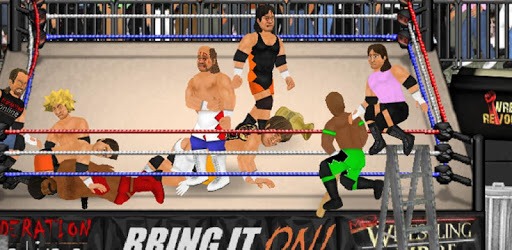
Wrestling Revolution PC screenshot

About Wrestling Revolution For PC

Wrestling Revolution is an Android app developed and published by MDickie at Google Play Store on Jan 31, 2013 for Android users. Wrestling Revolution is so popular that it has gained 10000000 installs so far and growing.

Wrestling Revolution: A Thrilling Virtual Experience

Are you a wrestling fan looking for an immersive gaming experience? Look no further than Wrestling Revolution. This game offers a unique blend of excitement, strategy, and fun, making it a must-play for anyone fascinated by the world of wrestling. Built by MDickie, Wrestling Revolution has been around for a while, continually evolving to attract both new and seasoned gamers.

Dive into the Wrestling World

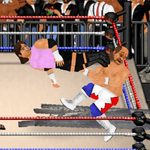
One of the standout features of Wrestling Revolution is its ability to transport players into a dynamic wrestling universe. From iconic moves like body slams and camel clutches to more advanced techniques like the inverted Frankensteiner, the game has an extensive repertoire of moves that keep players engaged. The game allows for intricate submissions and combos, adding a layer of strategy that goes beyond mere button-mashing.

Career Mode

The career mode in Wrestling Revolution is particularly captivating. Starting from a wrestling school, players work their way up to stardom. Although there are some minor challenges in the booking mode, this doesn't take away from the overall enjoyment. Imagine yourself booking matches, improving your skills, and aiming for the top spot in the wrestling world. This career mode is great, but additional features like a more diverse roster of women wrestlers and more championship titles could make it even more thrilling.

User-Friendly Controls

The game has intuitive and responsive controls that make it easy to perform even the most complex moves. It's also worth noting that there is an option for multiplayer, although it hasn't been fully enabled yet. Whether you're pinning your opponent or pulling off a high-flying move, the controls make the experience smooth and enjoyable.

A Need for Multiplayer

One area where Wrestling Revolution could improve is by incorporating an online multiplayer option. Imagine being able to wrestle with friends or other players around the globe, adding a competitive edge to the game. This feature could significantly elevate the user experience, making it possible to engage in real-time matches and communicate through a chat function while fighting.

A Word on Updates and Enhancements

Updates could breathe new life into an already amazing game. Some players miss the simpler, classic 2D style of the earlier versions, arguing that the switch to 3D did not meet expectations. More updates, particularly those that address performance issues and introduce new moves and characters, could revitalize interest.

A Universally Loved Game

Wrestling Revolution has many loyal fans who have been playing for years without getting bored. Its charm lies in its simplicity, combined with a depth of features that keep you hooked. From the customizable characters to the exciting career mode, there's something for every wrestling fan. Additionally, features like gang rivalries and more interactive elements could make the game even more enticing.

This game is more than a pastime; it's an experience. When you're wrestling in this game, it feels both thrilling and relaxing, a perfect combo for a truly captivating gameplay.

Can I run Wrestling Revolution on PC?

Yes, you can run Wrestling Revolution on PC, but first, you will need emulator software installed on your Windows or MAC, which you can download for free. In the below video, you will find Wrestling Revolution in action. Before you install the emulator, check out the minimum and recommended system requirements to run it seamlessly. They may change depending on which version of the emulator you choose. Therefore, we recommend you download the latest version of the emulator. Below you will find three free Android emulators that we have shortlisted based on their popularity:

How to Install Wrestling Revolution on Windows PC

BlueStacks

Minimum
  • OS: Microsoft Windows 7 and above.
  • Processor: Intel or AMD Processor.
  • RAM: Your PC must have at least 4GB of RAM. (Note that having 4GB or more disk space is not a substitute for RAM)
  • Storage: 5GB Free Disk Space.
  • You must be an Administrator on your PC.
Recommended:
  • OS: Microsoft Windows 10
  • Processor: Intel or AMD Multi-Core Processor with Single Thread benchmark score > 1000.
  • Graphics: Intel/Nvidia/ATI, Onboard or Discrete controller with benchmark score >= 750.
  • Please ensure Virtualization is enabled on your PC/Laptop.
  • RAM: 8GB or higher
  • Storage: SSD (or Fusion/Hybrid Drives)
  • Internet: Broadband connection to access games, accounts and related content.

Up to date graphics drivers from Microsoft or the chipset vendor.

  • To start with, download Bluestacks from its official website. The latest version of BluesStacks is v 5, and it is around 400 MB.
  • Once the download is done, click on the Bluestacks set up file to install it on your Windows PC. Follow the on-screen instructions and install it accordingly.
  • The next step is to launch the emulator using the desktop shortcut and sign in using your Google account.
  • Now, head over to Bluestacks home screen and click on the Google Play Store icon.
  • Hit the search bar in Google Play and search for Wrestling Revolution.
  • Install Wrestling Revolution from the Play Store by clicking the Install option, which completes downloading of Wrestling Revolution on PC.

NoxPlayer

Minimum
  • Operating System: Windows XP SP3, Windows Vista, Windows 7, Windows 8, Windows 10, and DirectX 9.0c
  • Processor: At least dual-core processor, both Intel, and AMD are OK
  • Video: Supports Open GL 2.0 or above
  • Memory: 1.5 GB RAM
Recommended
  • Operating System: Windows 7, Windows 8, Windows 10
  • Processor: Multiple core processors which support VT-x or AMB-V Virtualization Technology, better performance with this function enabled
  • Video: The higher performance, the better
  • Memory: 4 GB RAM

Storage: 1 GB available under installation path, 1.5GB available hard drive space

Internet: Broadband Internet connection

  • Download NoxPlayer from the official website. The latest version of NoxPlayer is v 3, and it is around 600 MB.
  • Now install the emulator using the downloaded setup file. Just go through the on-screen instructions and install NoxPlayer on your computer or laptop.
  • After the installation process, launch the Nox Android emulator and log in using your Google account when it asks you.
  • Click on the Google Play Store icon and head over to the search bar to search Wrestling Revolution. Once found, click on the Install button to install Wrestling Revolution for PC.
  • If you do not find Wrestling Revolution on Google Play Store or if you want to skip logging in to Google, you can sideload APK (download the .APK file from this page and open it with NoxPlayer).
  • Launch Wrestling Revolution from home-screen and start playing it on PC right away!

MEmu

Minimum
  • 2 cores x86/x86_64 Processor (Intel or AMD CPU)
  • WinXP SP3 / Win7 / Win8 / Win10 (Not recommended to run on Server/Enterprise)
  • Latest Windows DirectX 11 / Graphics driver with OpenGL 2.0
  • Hardware Virtualization Technology (Intel VT-x/AMD-V) shall be enabled in BIOS
  • 2GB of RAM (4GB for x64 system)
  • 5GB of hard disk free space
Recommended
  • OS: Microsoft Windows 10 with VT Enabled
  • CPU: Single Thread PassMark score > 1500 (Intel/AMD Multi-Core).
  • Graphics: Intel/Nvidia/ATI, Onboard or Discrete controller with PassMark score > 750.
  • Latest Windows DirectX 11 / Graphics driver with OpenGL 4.5 or higher
  • RAM: 8GB or higher
  • HDD: SSD, 10GB of hard disk free space
  • Internet: Broadband connection with low latency for FPS games
  • Download MEmu Play from the official website. The latest version of NoxPlayer is v 7.5.
  • When the download is completed, install the MEmu emulator on your PC. Follow the on-screen instructions and keep on clicking the Next button until the final step.
  • Now, using the desktop shortcut, look for the MEmu Play emulator and launch it. Once done, it will ask you to log in using your Google account, proceed with the same.
  • MEmu Play will ask you to log in using your Google account. When you log in, it will sync your Google account to MEmu Play. Launch the Google Play Store by clicking on the icon and search for Wrestling Revolution.
  • Click on the Install button once you find Wrestling Revolution from the search results. You can also sideload APK (download the .APK file from this page and open it with MEmu) if you want to skip above step.
  • After the installation of Wrestling Revolution, you're all set to use the app on PC!

Regardless of which Android emulator you install, the steps to install, configure, and running the Wrestling Revolution app on PC are the same.


Download Wrestling Revolution For PC